Basic tip: Create a consistent identity for yourself (or others)
If you use the same username at gmail, twitter, facebook and elsewhere, it will be easier for people to find you.
I have been using "stevestoneky" everywhere, so I don't have to remember my login - it is always that.
In my case, I couldn't use "stevestone" - it was already claimed. As more people are online that will get worse & worse. So it may take a little while to find a unique handle for yourself, I added my state's abbreviation to differential myself from ball players and digital artists.
Another idea related to this: claim emails for young people in your life BEFORE they are ready to use email. You have the email, and the password, and you can start sending email to your child. In 10-15 years, the most common "baby book" might be the emails they got when they were just a babe in arms. And you have them all in your "sent items" as well. And when they grow up, they won't have to be "crazzyname352splat@gmail.com" they will be closer to "firstnamelastname@gmail.com" because you claimed the email early.
Advanced Tool: Hootsuite
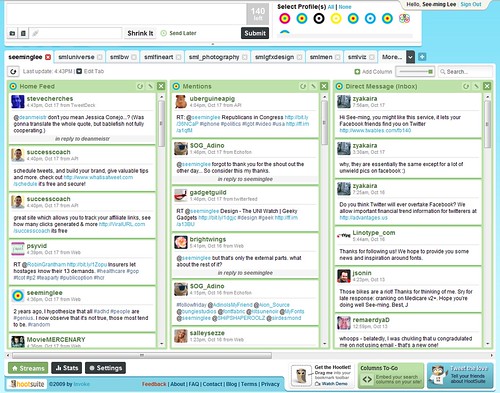
Hootsuite lets you have a "social media dashboard", where you can see your Facebook, Twitter, LinkedIn and other social media all in one place.
older screen shot from https://www.flickr.com/photos/seeminglee/4020450700/:
Thanks for using Creative Commons
So, you can see what is going on in one place, but what is even more useful is that it lets you post to one or multiple streams at the same time. Hootsuite also lets you schedule posts, or I usually have it set on "autoschedule" so that it posts at a time when more people are likely to see it.
You can run hootsuite on the web or from your smartphone.
Find out more about hootsuite at https://hootsuite.com/about
Use the comments to suggest a future topic, ask about these things, or add your own knowledge management tip.
Thursday, January 22, 2015
Monday, January 19, 2015
BLTKM 1: Alt-printscreen and IFTTT
Better Living Through Knowledge Management
Basic tip:
See something you need on a computer screen? Click on the window you want to take a picture of. Hold down the "ALT" key and then press the "PrtScn" key. It will look like nothing happened, but your Windows machine will have put a copy of the active window. You can then "paste" it into a Word Processing program (Word, Google Docs, etc.)

There's a picture of what my computer looked like as I typed that.
On Macintosh, use "Grab" to get a picture of what you want.
Advanced tool:
IFTTT
ifttt.com
If This, Then That only makes sense if you already have several social media accounts, because it lets the accounts talk to each other. If you already have a Facebook account, and you already have a DropBox account, for instance, you can tell IFTTT - if someone tags me in a picture on Facebook, then save a copy of that picture to my DropBox account.
There are THOUSANDS of other possibilities. Send me a text if the National Weather service says that it could freeze overnight. When Amazon puts a list of new "free to kindle" books out, email me that list. When I leave work (as determined by the location of my smartphone, if I've connected that to IFTTT), make an entry in a Google Sheet for me, so I can calculate how much time I'm spending at work.
Note that this is also a potentially dangerous thing to do. You are connecting your social media/phone/other things together, which could make stalking you easier.
But I've been using IFTTT for a while now, and so I don't have to retype things from Twitter to Facebook - if I post something on Twitter, IFTTT takes care of posting to Facebook for me.
Find out more about IFTTT at https://ifttt.com/wtf
Use the comments for questions / responses
Basic tip:
See something you need on a computer screen? Click on the window you want to take a picture of. Hold down the "ALT" key and then press the "PrtScn" key. It will look like nothing happened, but your Windows machine will have put a copy of the active window. You can then "paste" it into a Word Processing program (Word, Google Docs, etc.)
On Macintosh, use "Grab" to get a picture of what you want.
Advanced tool:
IFTTT
ifttt.com
If This, Then That only makes sense if you already have several social media accounts, because it lets the accounts talk to each other. If you already have a Facebook account, and you already have a DropBox account, for instance, you can tell IFTTT - if someone tags me in a picture on Facebook, then save a copy of that picture to my DropBox account.
There are THOUSANDS of other possibilities. Send me a text if the National Weather service says that it could freeze overnight. When Amazon puts a list of new "free to kindle" books out, email me that list. When I leave work (as determined by the location of my smartphone, if I've connected that to IFTTT), make an entry in a Google Sheet for me, so I can calculate how much time I'm spending at work.
Note that this is also a potentially dangerous thing to do. You are connecting your social media/phone/other things together, which could make stalking you easier.
But I've been using IFTTT for a while now, and so I don't have to retype things from Twitter to Facebook - if I post something on Twitter, IFTTT takes care of posting to Facebook for me.
Find out more about IFTTT at https://ifttt.com/wtf
Use the comments for questions / responses
Subscribe to:
Posts (Atom)
